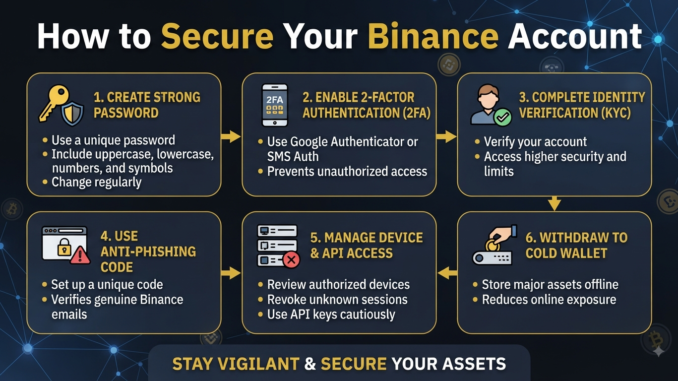
Cryptocurrency has revolutionized how we think about wealth, ownership, and global financial transactions. Among the vast ecosystem of digital assets, Binance stands as one of the largest and most influential cryptocurrency exchanges in the world, serving millions of users daily. However, the very features that make decentralized and centralized digital finance so appealing—speed, global reach, and anonymity or pseudonymity—also make it a primary target for malicious actors, hackers, and cybercriminals.
When you store your hard-earned digital assets on an exchange, you are essentially entrusting a third party with your financial security. While Binance implements robust, industry-standard security infrastructure, exchange security is ultimately a shared responsibility. Platform-level defenses can shield against massive external breaches, but individual account security depends heavily on the proactive measures taken by the account holder. A single compromised password or a lapsed security habit can lead to irreversible losses.
Securing your Binance account is not a one-time task; it is an ongoing process of digital hygiene, risk management, and vigilance. In this comprehensive guide, we will explore the essential steps, advanced configurations, and psychological traps you must navigate to build an impenetrable fortress around your Binance account.
Step 1: Fortify Your Account Credentials
The foundation of any secure account begins with your login credentials: your email address and your password. Many users underestimate the vulnerability of weak credentials, treating exchange logins with the same casual attitude they apply to low-stakes website accounts.
Creating an Ironclad Password
Your Binance password should never be a word, phrase, or combination of personal details that can be guessed or found via social engineering.
- Length and Complexity: Aim for a password that is at least 16 characters long, combining uppercase letters, lowercase letters, numbers, and special symbols.
- Uniqueness: Never reuse passwords across platforms. If a minor forum or e-commerce site you use suffers a data leak, cybercriminals will automatically run credential-stuffing attacks using your email and password combination against high-value targets like Binance.
- Password Managers: Utilize a reputable, encrypted password manager (such as 1Password, Bitwarden, or Dashlane) to generate and store complex, random passwords securely.
Securing Your Master Email Account
Your email address is the master key to your digital life. If an attacker gains access to your email, they can easily request password resets, intercept verification codes, and bypass secondary security barriers.
- Dedicated Email: Consider creating a unique, high-security email address exclusively for your cryptocurrency exchange accounts, one that is never used for public sign-ups, social media, or marketing newsletters.
- Advanced Email Protection: Enable hardware-key-backed Two-Factor Authentication (such as a YubiKey) on your email provider. Ensure your recovery phone number and backup email addresses are equally secure and up to date.
Step 2: Master Two-Factor Authentication (2FA)
Passwords alone are no longer sufficient to protect financial accounts. Two-Factor Authentication (2FA) adds a vital second layer of defense, ensuring that even if your password is stolen, unauthorized parties cannot access your account.
Understanding 2FA Options on Binance
Binance offers several forms of 2FA, but not all are created equal in terms of security.
- Passkeys and Hardware Security Keys (FIDO2/WebAuthn): This is the gold standard of account security. Physical security keys like YubiKeys or built-in biometric authenticators (Apple Touch ID, Windows Hello) require physical interaction or biometric verification. They are entirely immune to remote phishing attacks.
- Authenticator Apps (TOTP): Applications like Google Authenticator, Authy, or Aegis generate time-based, six-digit codes that refresh every 30 seconds. While secure, they remain slightly vulnerable to sophisticated, real-time adversary-in-the-middle phishing sites.
- SMS and Email Verification: While better than nothing, SMS-based 2FA is notoriously weak due to vulnerabilities like SIM-swapping attacks, where malicious actors trick telecom providers into porting your phone number to a device they control. Whenever possible, disable SMS authentication in favor of authenticator apps or hardware keys.
Step 3: Implement Advanced Platform Settings
Beyond passwords and 2FA, Binance provides granular security controls that allow you to lock down your account environment and restrict automated access.
Anti-Phishing Code
Phishing is one of the most common vectors used by scammers to steal credentials. They send emails designed to look identical to official Binance correspondence, prompting you to click a link and log into a fake replica site.
- How It Works: By setting up an Anti-Phishing Code in your Binance security settings, a unique alphanumeric code will be embedded in every genuine email sent to you by Binance.
- The Rule: If an email claims to be from Binance but does not display your unique anti-phishing code, you can immediately identify it as a malicious phishing attempt and disregard it.
Withdrawal Address Whitelisting
To protect your funds even in the catastrophic event that an unauthorized user gains access to your account, you should enable withdrawal address whitelisting.
- Restricting Destinations: When this feature is active, your account can only withdraw funds to pre-approved, trusted cryptocurrency wallet addresses that you have explicitly verified and locked.
- Cool-Down Periods: Adding a new withdrawal address typically triggers a mandatory 24-hour lock on withdrawals, providing you with a critical window of time to freeze your account if you notice suspicious activity.
API Key Management
If you use third-party portfolio trackers, tax software, or automated trading bots, you will likely interact with Binance via API keys.
- IP Restrictions: Always restrict API access to specific, trusted IP addresses. Never leave API keys unrestricted across the open internet.
- Permission Control: Limit API permissions strictly to what is necessary. For example, if a tool only needs to read your balance for tax purposes, never grant it “Enable Trading” or “Enable Withdrawals” permissions.
Step 4: Recognize and Avoid Social Engineering
Technology can block external intrusions, but human psychology remains the weakest link in any security chain. Scammers are well aware of this and employ sophisticated social engineering tactics to manipulate users into compromising their own accounts.
Common Crypto Scams to Watch For
- Impersonation Scams: Fraudsters posing as Binance customer support agents, Telegram administrators, or security officials may reach out offering “assistance” with account verification, stuck transactions, or wallet recovery. Remember that official support will never ask for your password, private keys, or 2FA codes.
- Giveaway and Investment Scams: Social media platforms frequently feature deepfake videos or compromised accounts promoting “double your crypto” or high-yield staking giveaways. These are invariably fraudulent schemes designed to drain your wallet.
- Malicious Browser Extensions: Be cautious when installing browser extensions. Malicious extensions can monitor your web traffic, inject code into web pages, and intercept clipboard data to swap deposit addresses during transfers.
Step 5: Maintain Vigilance and Continuous Hygiene
Security is not a static destination; it is a continuous lifestyle habit. To maintain long-term safety, incorporate these regular practices into your routine:
- Monitor Account Activity: Regularly check your account’s device management and login history page on Binance. Review authorized devices, active sessions, and recent IP addresses to ensure no unrecognized access has occurred.
- Keep Software Updated: Ensure your operating systems, web browsers, mobile devices, and antivirus software are always updated to the latest versions to patch known security vulnerabilities.
- Secure Your Physical Environment: Always lock your computer or mobile device when stepping away. If you manage large sums of cryptocurrency, consider using a dedicated, clean computer or operating system environment solely for financial transactions.
By implementing these comprehensive measures—fortifying your credentials, adopting hardware-grade 2FA, utilizing platform safety tools, staying alert to scams, and maintaining rigorous digital hygiene—you can significantly mitigate risks and navigate the world of cryptocurrency with confidence and peace of mind.
ဇာတ်ကားများ ကြည့်ရှုရန်
အောက်ကခလုတ်ကို နှိပ်ပြီး ဝင်ရောက်ကြည့်ရှုနိုင်ပါပြီ
Leave a Reply